Command Actions
Trigger server or player commands when a citizen is interacted with. Supports delays, placeholders, and a special message-sending shorthand.
Use Cases
Open a shop GUI, teleport the player, give items, run quests, send formatted chat messages — any command your server supports can be fired from a citizen interaction.
Opening the Command Editor
From the Edit Citizen screen, click Edit Commands in the Quick Actions section. This opens the Command Actions list for that citizen.
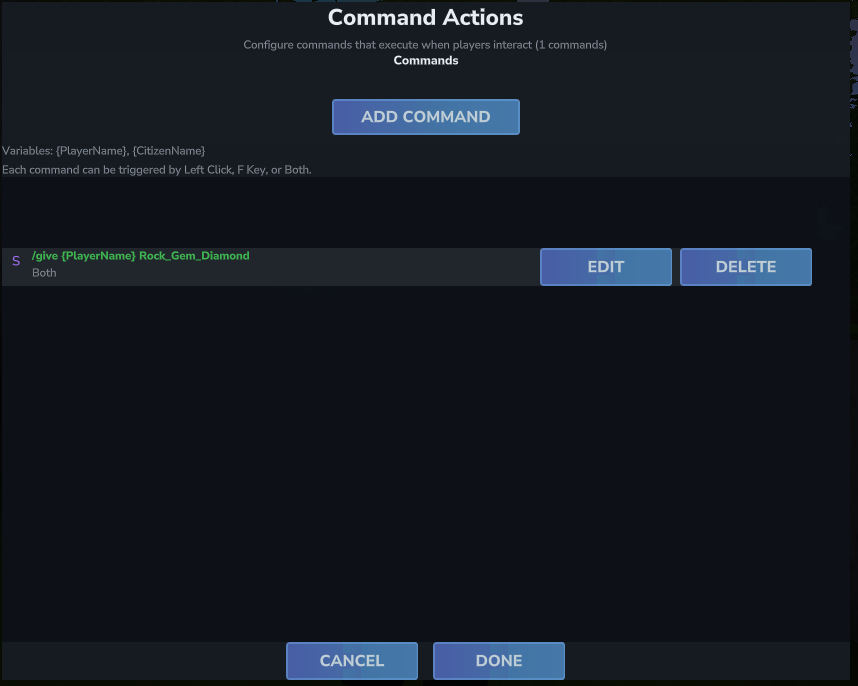
The list shows each configured command with a color-coded icon indicating whether it runs as the server (purple) or as the player (blue). Click Add Command to create a new one, or use the Edit and Delete buttons on each entry.
Adding / Editing a Command
Clicking Add Command (or Edit on an existing command) opens the command editor with four settings:
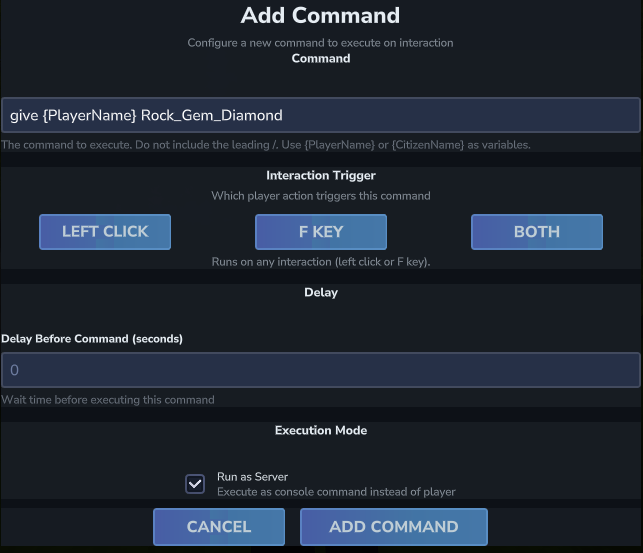
Command
Enter the command to execute. Do not include a leading / — HyCitizens adds it automatically. You can use the placeholders {PlayerName} and {CitizenName} anywhere in the command text.
give {PlayerName} Rock_Gem_Diamond 1
teleport {PlayerName} 100 64 200
xp add {PlayerName} 50Interaction Trigger
Which player action fires this command:
| Trigger | When it Fires |
|---|---|
| Left Click | Player left-clicks the citizen |
| F Key | Player presses F while looking at the citizen |
| Both | Either interaction fires the command (default) |
| First-Time Interaction | Only fires the very first time this player interacts with this citizen. Useful for one-time quest starts or unlock sequences. |
Delay (seconds)
How long to wait before executing this command after the interaction. Set to 0 for immediate execution. You can use delays to sequence multiple commands (see Run Order & Sequences below).
Run as Server
When checked, the command is executed by the server console with elevated privileges. When unchecked, the command runs as the player with their own permissions.
- Use Run as Server = on for admin commands like giving items, teleporting, awarding XP.
- Use Run as Server = off when the player needs to execute the command with their own permissions.
Click Add Command (or Save Changes) to save, then click Done on the command list to apply all changes to the citizen.
Placeholders in Commands
The following placeholders are automatically replaced in the command string. They are not case sensitive.
| Placeholder | Replaced With |
|---|---|
{PlayerName} |
The interacting player's username |
{CitizenName} |
This citizen's display name |
{NpcX} |
The citizen's X coordinate |
{NpcY} |
The citizen's Y coordinate |
{NpcZ} |
The citizen's Z coordinate |
Special: {SendMessage} Prefix
If a command starts with {SendMessage}, HyCitizens will send the rest of the text as a formatted chat message to the player instead of running it as a server command. This supports the same color tags and placeholders as regular messages.
{SendMessage}{GOLD}You have discovered a secret, {PlayerName}!This is useful when you want to send a styled chat message via the command system rather than the Messages editor — for example, as part of a timed sequence.
Selection Mode
When a citizen has multiple commands, the Selection Mode controls which one(s) fire each interaction:
| Mode | Behavior |
|---|---|
| All | Every command runs (default). Commands execute in list order with their configured delays. |
| Random | A single command is chosen at random from all commands that match the interaction trigger. |
| Sequential | Commands cycle in order per player per citizen. Each player tracks their own position independently. |
Run Order & Sequences
In All mode, multiple commands execute in list order. Use individual delays to create scripted sequences:
Command 1: {SendMessage}{WHITE}Prepare yourself...
  Run as Server: false | Delay: 0.0s

Command 2: {SendMessage}{RED}You have entered a restricted zone!
  Run as Server: false | Delay: 2.0s

Command 3: warp PvPArena {PlayerName}
Run as Server: true | Delay: 3.0s/ in the command field — HyCitizens adds it automatically. Entering /teleport will fail, but teleport will work correctly.