Messages & Interactions
Configure what a citizen says when a player interacts with them. Supports colors, placeholders, delays, and multiple delivery modes.
Opening the Messages Editor
From the Edit Citizen screen, click the Messages button in the Quick Actions section. This opens the Messages editor for that citizen.
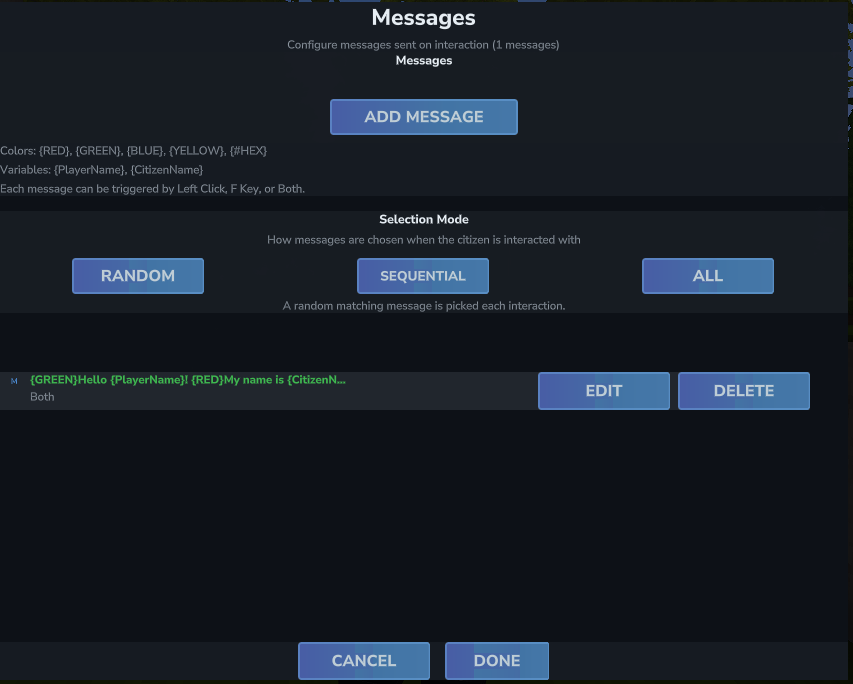
At a glance, the Messages screen shows:
- A quick reference card showing available color codes and variable placeholders.
- An Add Message button to create a new message.
- A Selection Mode setting controlling how multiple messages are chosen.
- An Enabled/Disabled toggle for the entire messages system on this citizen.
- The full list of configured messages, each with an Edit and Delete button.
Adding a Message
Click Add Message to open the message editor. Each message has three settings:
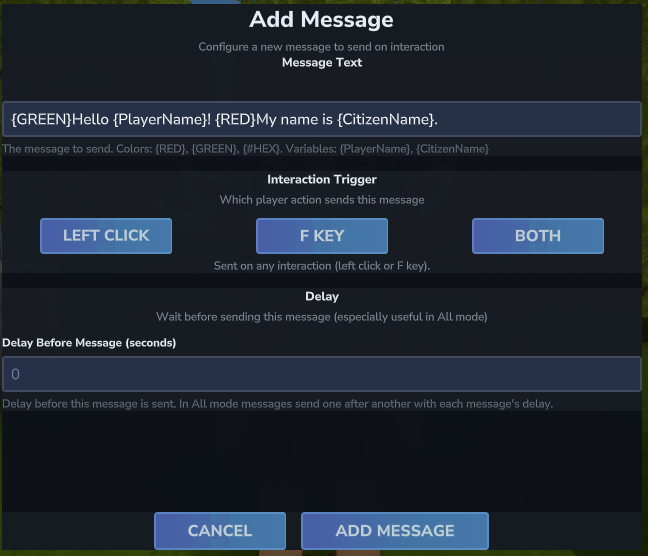
Message Text
Type the text you want the citizen to send to the player. You can use color tags and placeholders anywhere in the text. See the Color Formatting and Placeholders sections below for syntax details.
Interaction Trigger
Choose which player action sends this message:
| Trigger | How to Activate |
|---|---|
| Left Click | Player left-clicks the citizen |
| F Key | Player presses F while looking at the citizen |
| Both | Either interaction triggers the message (default) |
| First-Time Interaction | Only fires the very first time this player interacts with this citizen. Useful for one-time greeting or quest intro messages. |
Delay (seconds)
How long to wait before sending this message after the interaction. Useful in All mode to stagger multiple messages and create a conversational effect. In other modes the delay simply applies before the single chosen message is sent.
Click Add Message (or Save Changes when editing) to confirm.
Selection Mode
When a citizen has multiple messages, the Selection Mode controls which one(s) fire each interaction:
| Mode | Behavior |
|---|---|
| Random | A single message is chosen at random from all messages that match the interaction trigger. |
| Sequential | Messages cycle in order per player per citizen. Each player tracks their own position independently, so two players can be on different messages simultaneously. |
| All | All matching messages are sent one after another. Per-message delays are respected in sequence. |
Example: Staggered Conversation (All mode)
Message 1: "{WHITE}Hmm..."             — Delay: 0.0s
Message 2: "{GREEN}Oh! It's you, {PlayerName}!"  — Delay: 1.5s
Message 3: "{GOLD}Welcome back to our village."  — Delay: 3.0s
Selection Mode: AllEnabling / Disabling Messages
The Enabled toggle at the bottom of the Messages screen turns all messages for this citizen on or off without deleting them. Useful for temporarily silencing a citizen.
Color & Rich Formatting
Wrap a color name or hex code in curly braces to apply color. The color applies to all text that follows until the next color tag. You can also apply bold, italic, and clickable link formatting.
Bold & Italic
Wrap text in **double asterisks** for bold, or *single asterisks* for italic.
**This text is bold.**
*This text is italic.*
***This text is bold and italic.***Clickable Links
Use standard Markdown link syntax: [label text](url).
[Click here to visit our website!](https://example.com)Named Colors
{RED}This text is red.
{GREEN}This text is green.
{GOLD}Welcome to the village!Hex Colors
{#FF6B35}Custom orange text.
{#ADD8E6}Light blue text.All Available Named Colors
BLACK, WHITE, RED, GREEN, BLUE, YELLOW, ORANGE, PINK, PURPLE, CYAN, MAGENTA, LIME, MAROON, NAVY, TEAL, OLIVE, SILVER, GRAY, GREY, BROWN, GOLD, ORCHID, SALMON, TURQUOISE, VIOLET, INDIGO, CORAL, CRIMSON, KHAKI, PLUM, CHOCOLATE, TAN, LIGHTBLUE, LIGHTGREEN, LIGHTGRAY, LIGHTGREY, DARKRED, DARKGREEN, DARKBLUE, DARKGRAY, DARKGREY, LIGHTPINK, LIGHTYELLOW, LIGHTCYAN, LIGHTMAGENTA, ORANGERED, DEEPSKYBLUE
Placeholders
Use these placeholders anywhere in a message — they are replaced automatically when the message is sent. Placeholders are not case sensitive.
| Placeholder | Replaced With |
|---|---|
{PlayerName} |
The interacting player's username |
{CitizenName} |
This citizen's display name |
{NpcX} |
The citizen's X coordinate |
{NpcY} |
The citizen's Y coordinate |
{NpcZ} |
The citizen's Z coordinate |
{GREEN}Greetings, {PlayerName}!
{WHITE}I am {CitizenName}. How may I assist you today?